LapTAR Know which corner cost you.
A lap timer that coaches: a verdict for every part of every turn, measured against your car, and a voice that calls your corners on the next lap.
LaptimerTimeAttackRun


Free on iPhone and Android, and every account has Pro until 30 June 2027. Laps come from a RaceBox or Dragy receiver.
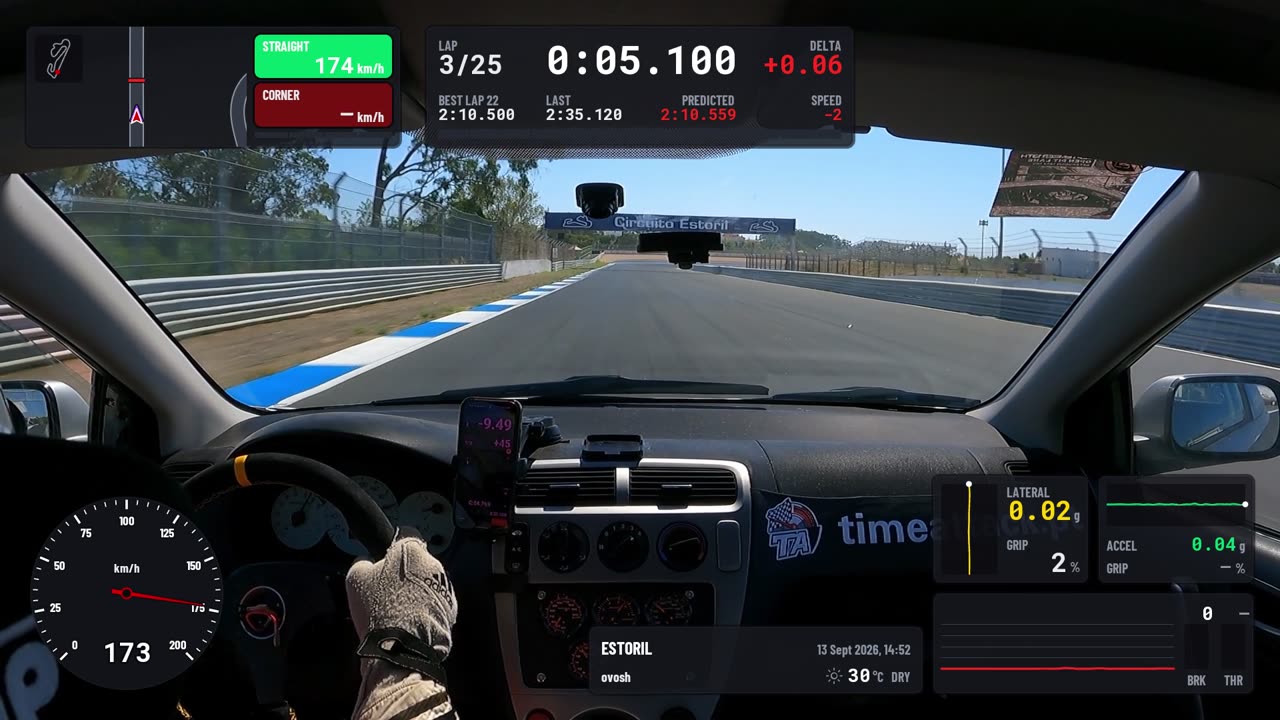
Where lap timers stop.
A lap timer gives you the time, the sectors and the traces. LapTAR starts there. Five things that set it apart from the apps and devices compared below.
It says the fix, not the number.
A timer says lap 7 was four tenths slower. LapTAR says turn 3 cost it, in the braking, because you braked softer than the car can take, and what to do about it on the next lap. Every part of every turn, every lap, with its cost.
Its optimal lap is your car, simulated.
Elsewhere the optimal lap is your best sectors added up, or your best video segments spliced together. LapTAR measures the grip your car held, the hardest stop it made and its pull on every straight, then drives that along your best lines. It knows where you could have braked later, and it is never slower than a lap you drove.
A voice that calls your corners.
Live voice coaching has meant a windshield device that lists at $1,199.99. LapTAR does it from the phone, and goes a step further: pick a corner and the coach calls its points on every lap. Brake. Turn. Power. Not "brake later" but the metre to brake at, moved for the speed you arrive with.
Measured, not generated.
Every verdict comes from your car's own numbers on that lap: its grip, its braking, its power, on the line you took. No language model writes the advice. The same fault always gets the same words, and nothing is invented to fill a silence.
Coached where timing is not allowed.
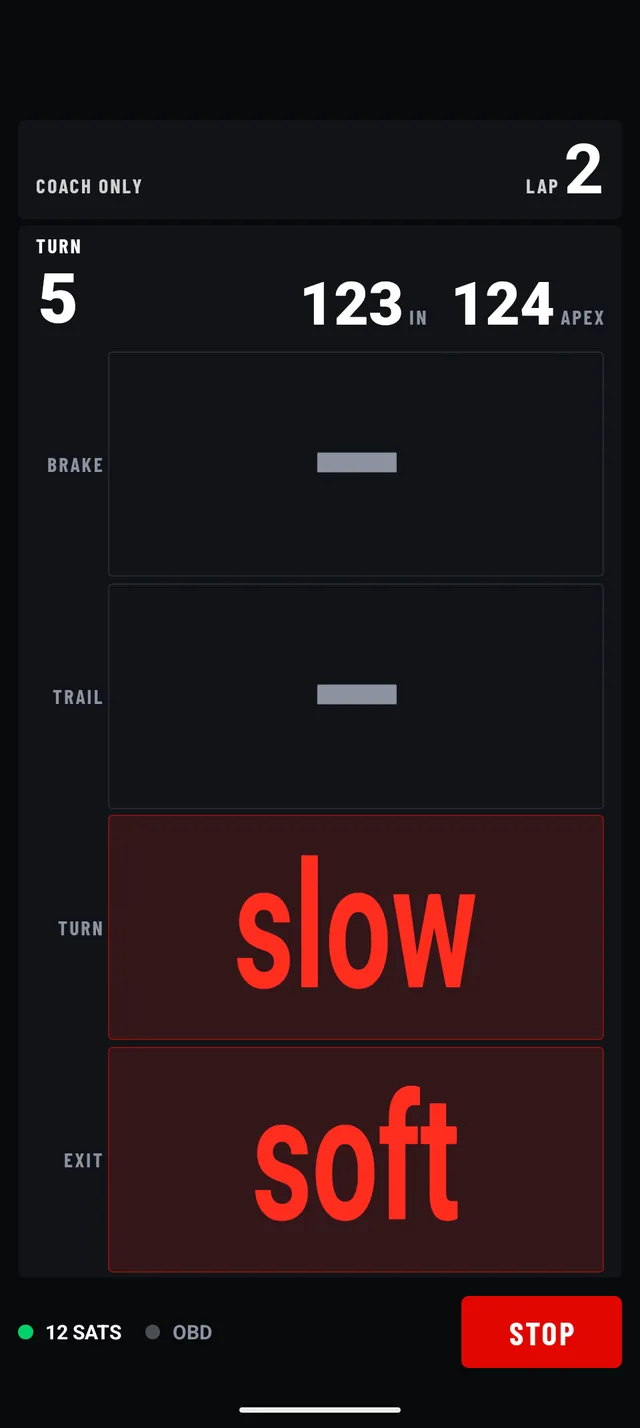
Some track days do not allow lap timing. Coach only takes every time off the screen and out of the voice and keeps the rest: the corner verdicts, the called corners, the fix before and better or worse after. The times wait for the session page. None of the apps and devices compared below lists a mode like it.
A co-driver in your ear.
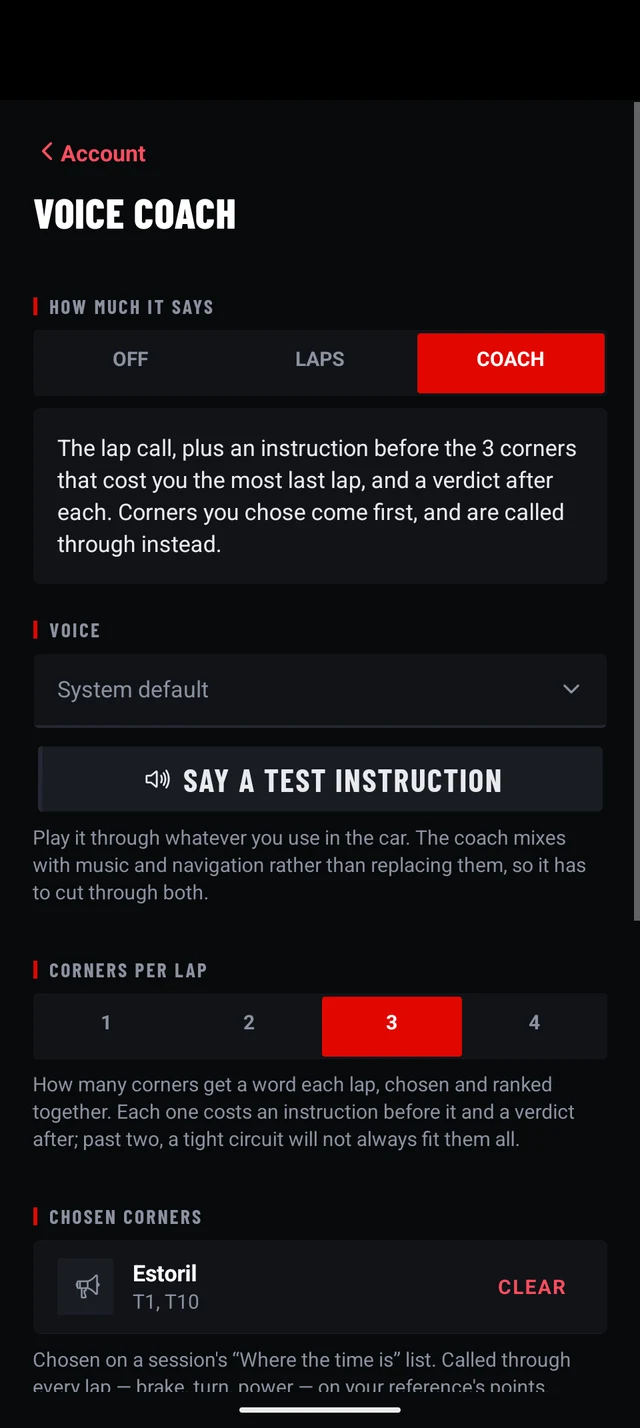
Pick a corner on the session's list and the coach calls it through on every lap: brake, turn, power, full throttle, each word timed to land on your optimal lap's own point. The corners you leave to it get an instruction before and a verdict after. Rather see it than hear it? The calls can fill the screen. And on a day when timing is not allowed, the coach rides along with every time taken off the screen.
Turn 1 · a corner you picked
- 0.0 sNext right. On my call.
- 3.3 sBrake.
- 6.5 sTurn.
- 11.0 sPower.
- 12.5 sWorse.
Turn 7 · a corner the coach picked
- 0.0 sNext right. Brake 45 metres later.
- 14.0 sBetter.
How does it know when to say "brake"?
From your optimal lap, not from a map. The optimal carries where it braked, where it turned in, where the power went on and where it was flat, so each word is aimed at one of those points. The brake call is the one that moves: the app reads your speed on the approach, predicts your arrival, and says it earlier when you need more road to shed the speed, never later than the optimal's own point. Each word is said about seven tenths of a second before its point, the time a voice takes to start and a foot takes to answer.
What happens when the lap goes wrong?
It says "Missed", at once. No braking after the call, or time lost inside the corner beyond what the last lap lost there, and the rest of that corner's calls are dropped with that one word, so you are not left waiting for "Turn". No verdict follows: there is no plan left to grade. A car ahead on the approach means the corner is not called at all; a co-driver does not call a braking point into traffic. The next lap starts clean.
Why does it say "next right" and not "turn four"?
Because the app's turn numbers are not the circuit's. It finds every bend that leaves a mark in the data, including ones the track map does not count, so a number could be one off from the one in your head. A direction is never wrong. Two corners on a lap can get the same words; the app knows which one it meant.
One corner, four fixes.
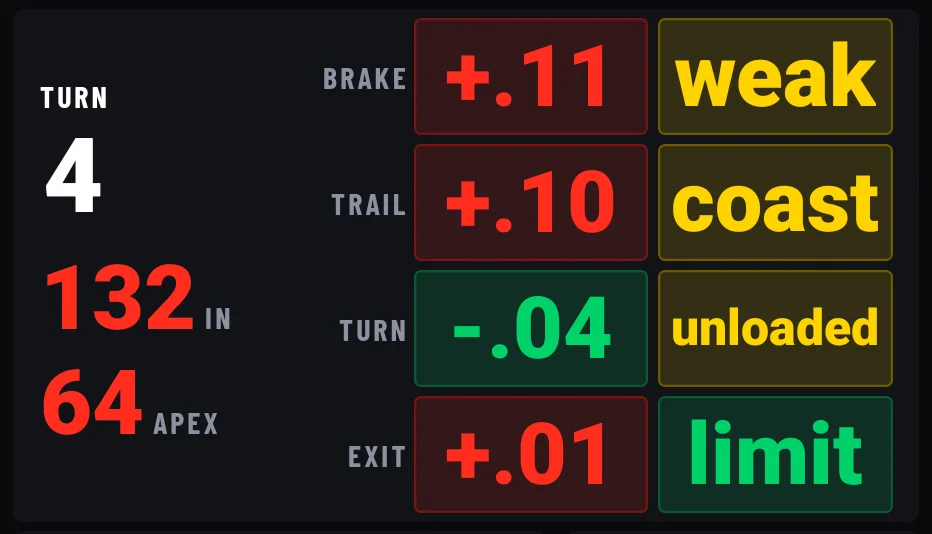
Every turn is split into four parts: brake, trail, turn and exit. Each part gets two answers, and they are kept apart on purpose: the time it cost against your optimal lap, and a grade for how much of the car you used.
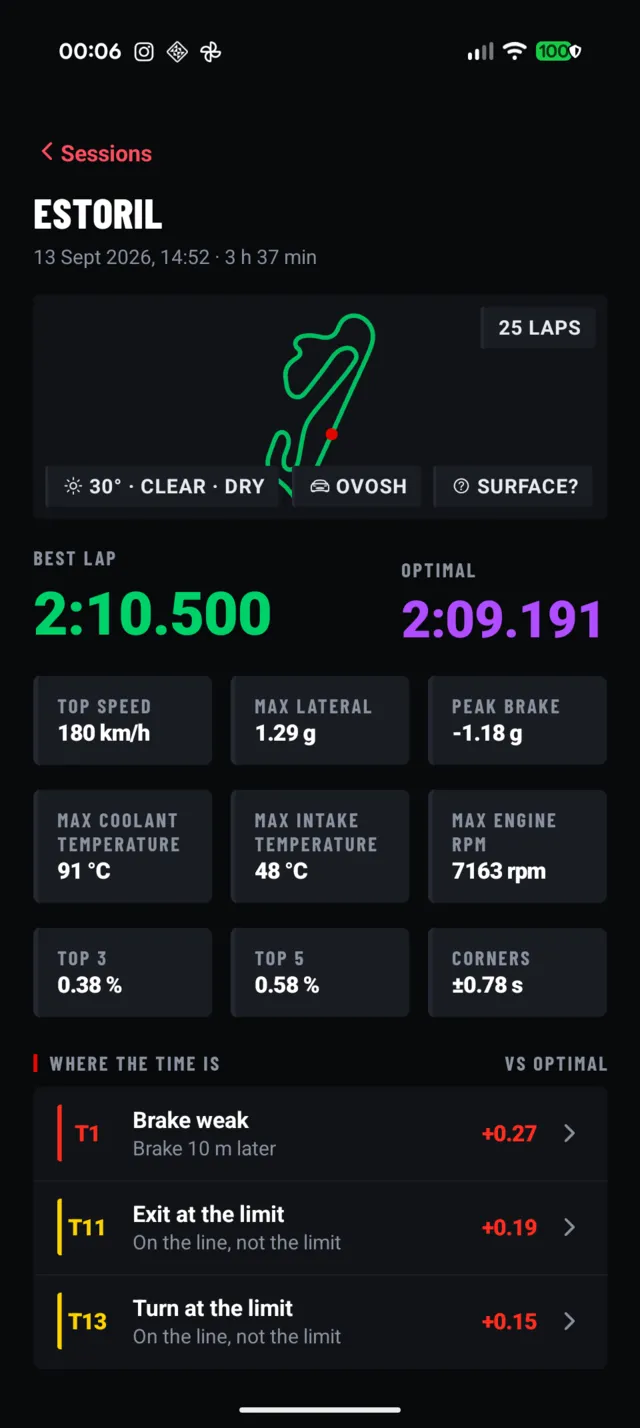
Estoril · 13 Sep 2026Best · lap 222:10.500Optimal2:09.191
What do the grades mean?
- limit
- The car was at its grip limit. Nothing to fix in the driving; if it still lost time, the line did.
- early
- Braked before the car needed to. Brake later.
- weak
- Braked softer than the car can take. Brake harder.
- released
- Came off the brakes before turn-in. Stay on the brakes to turn-in.
- coast
- Coasted between the brakes and turn-in. Trail the brakes in.
- slow
- Carried less speed through the middle than the car had. Carry more speed.
- unloaded
- Let the load off in the middle. Hold the load through the middle.
- lifted
- Lifted where the car takes it flat. Stay flat.
- delayed
- Waited for the throttle after the apex. Throttle sooner.
- soft
- Fed the throttle in instead of going to full. Full throttle.
Why can "limit" still cost time?
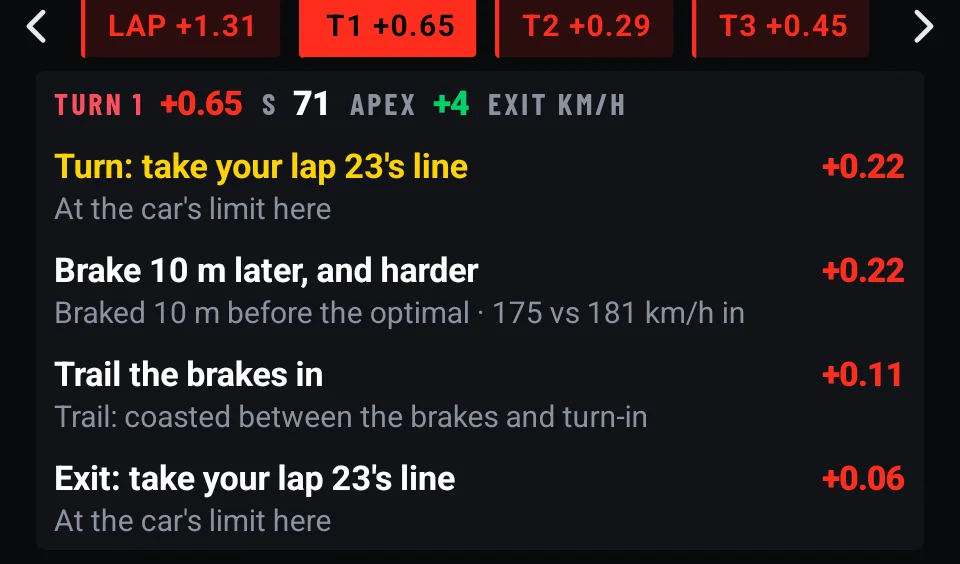
The two columns measure different things. vs your optimal is time: how this part of the corner compares with the best you have driven it. vs the car is grip: how close you were to what the car can do on the line you took.
So a part can be graded limit and still slow, when the car was working flat out on a slower line, as in turn 1 above. And a part can be graded weak while costing almost nothing, when you left grip unused but the line made up for it. The fix tells you which one to work on.
What is the optimal lap?
Not a sum of your best sectors. LapTAR measures what your car proved it can do in the session: the grip it held, the hardest stop it made, its pull on each straight. A physics model then drives that along the best line you took through each group of corners, joined on the straights. So it knows where you could have braked later and how fast each corner could go, and it is never slower than any lap you drove.
It is not a faster driver's ghost: every figure in it is one your car has already shown. It is rebuilt after every lap. On 13 Sep at Estoril the best lap was 2:10.500 and the optimal 2:09.191.
The live screen can chase the optimal or the session's best lap; you choose on the Timer tab.
The app, as it is today.
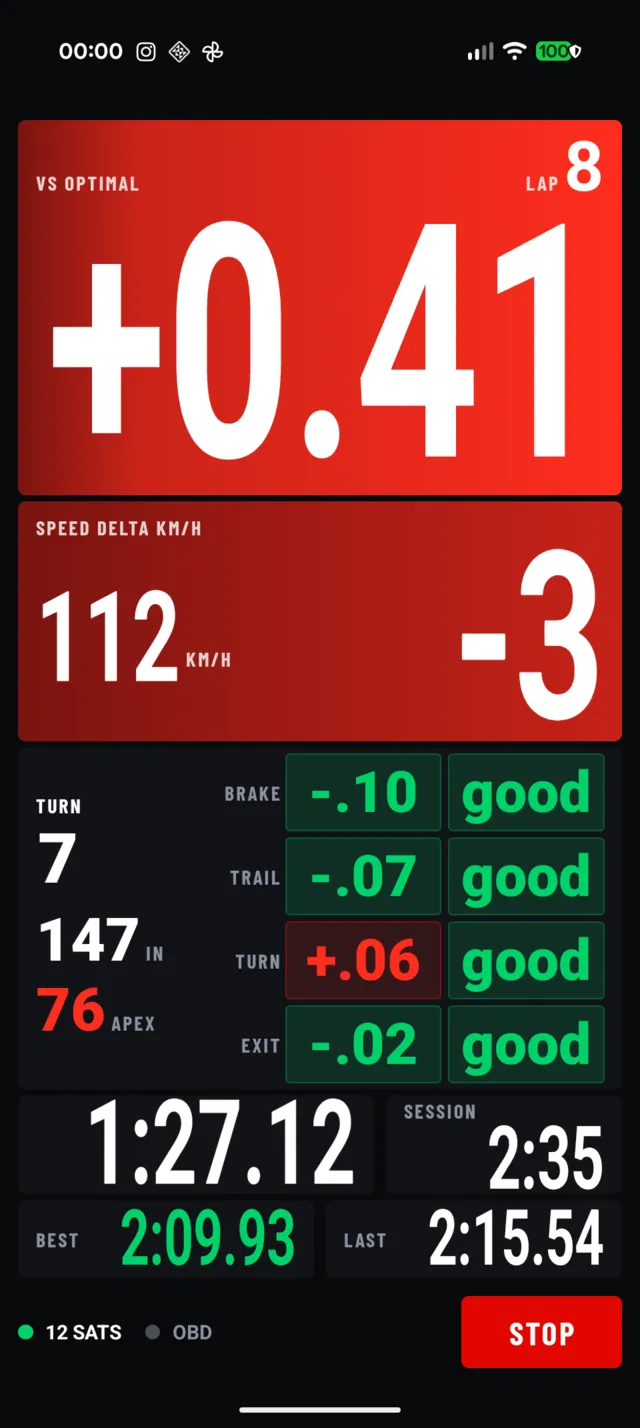
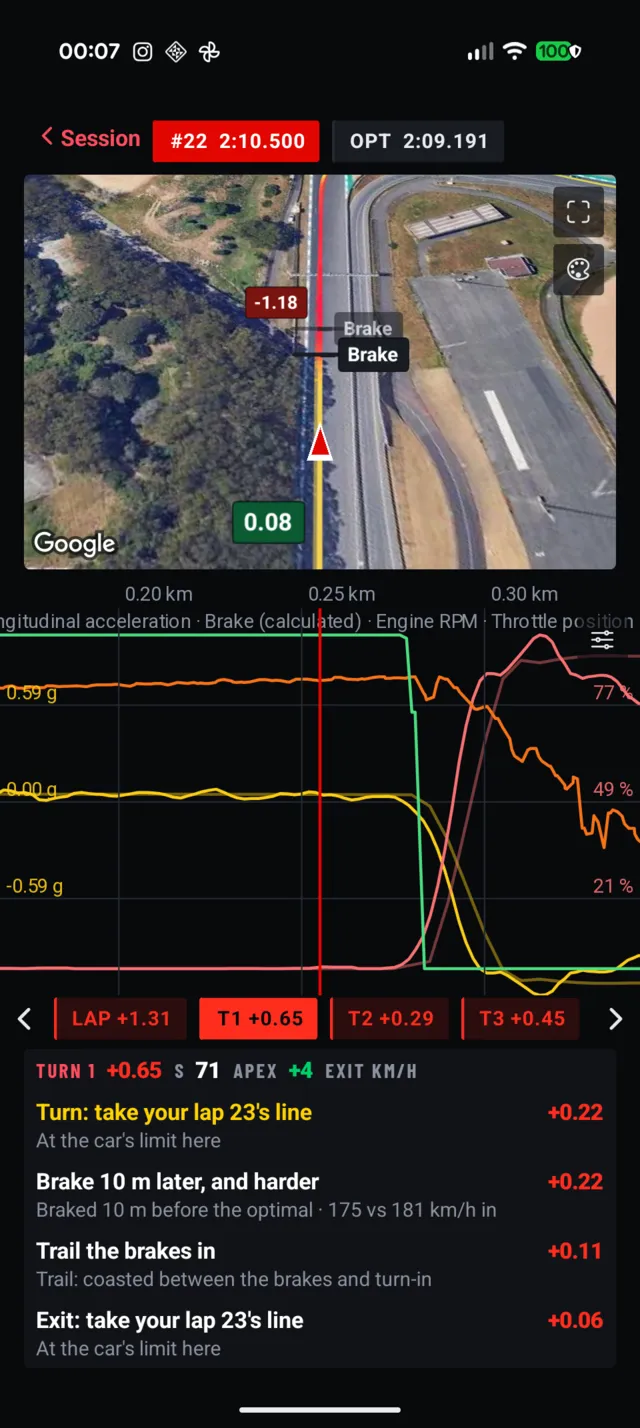
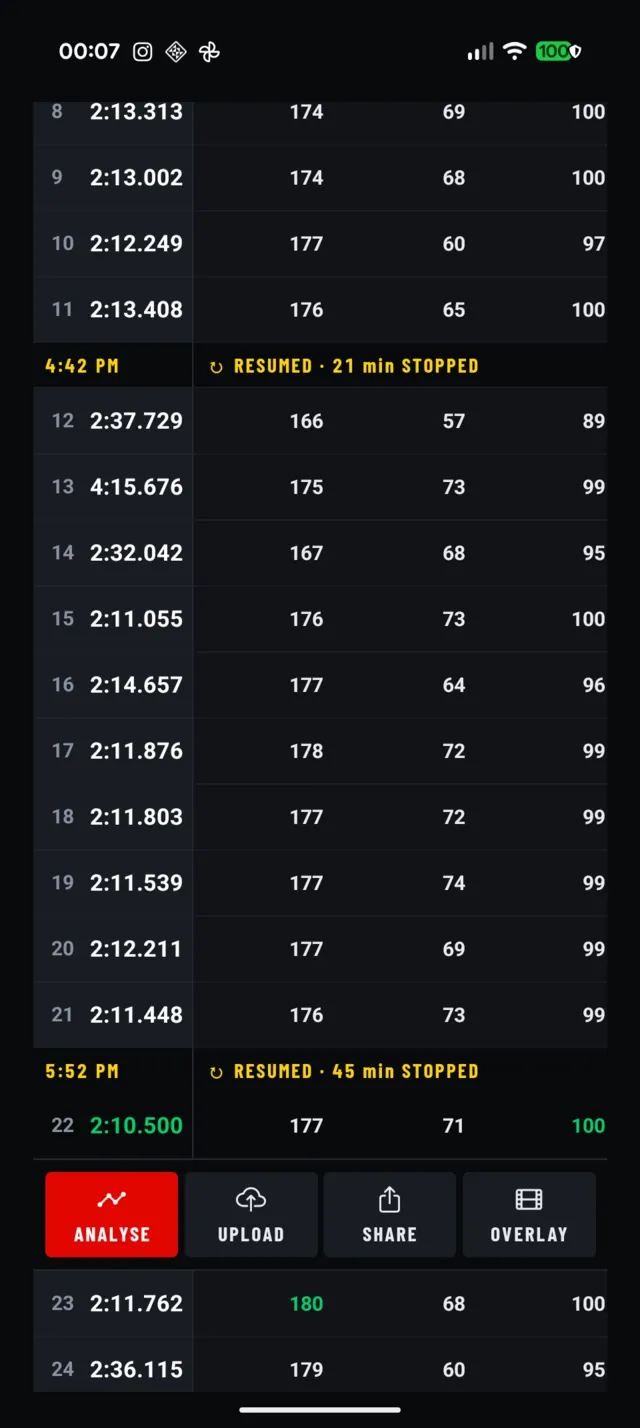
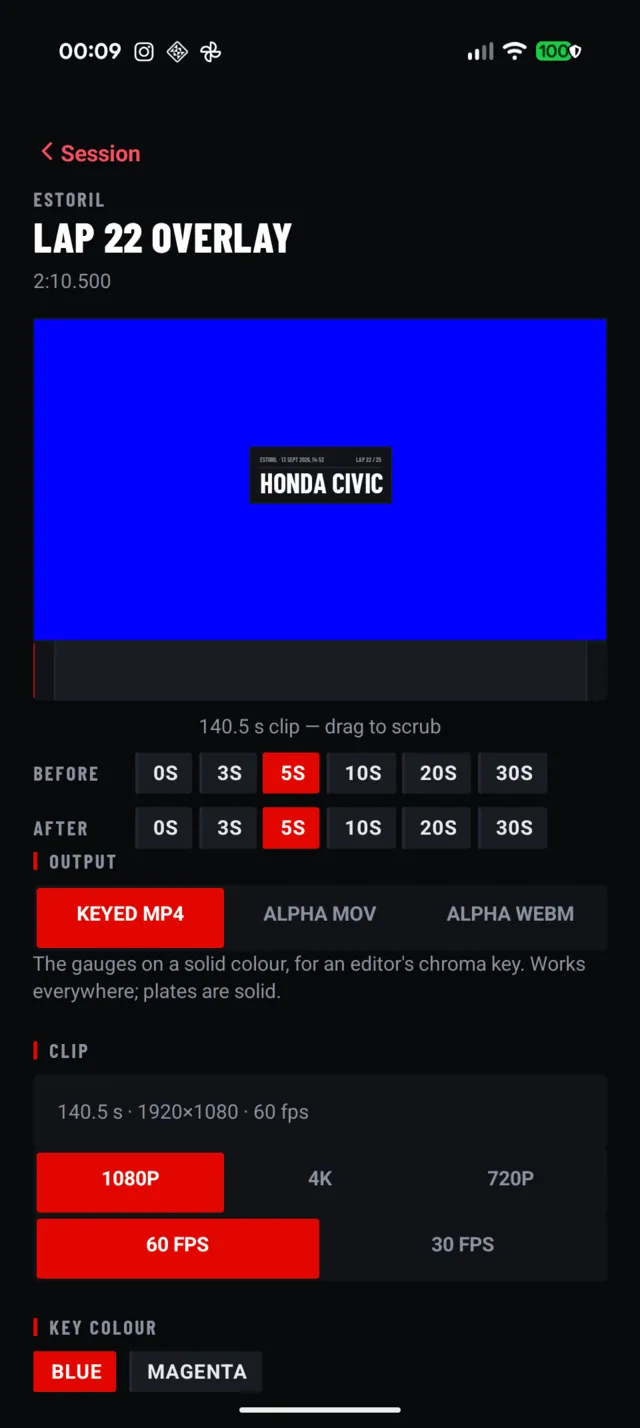
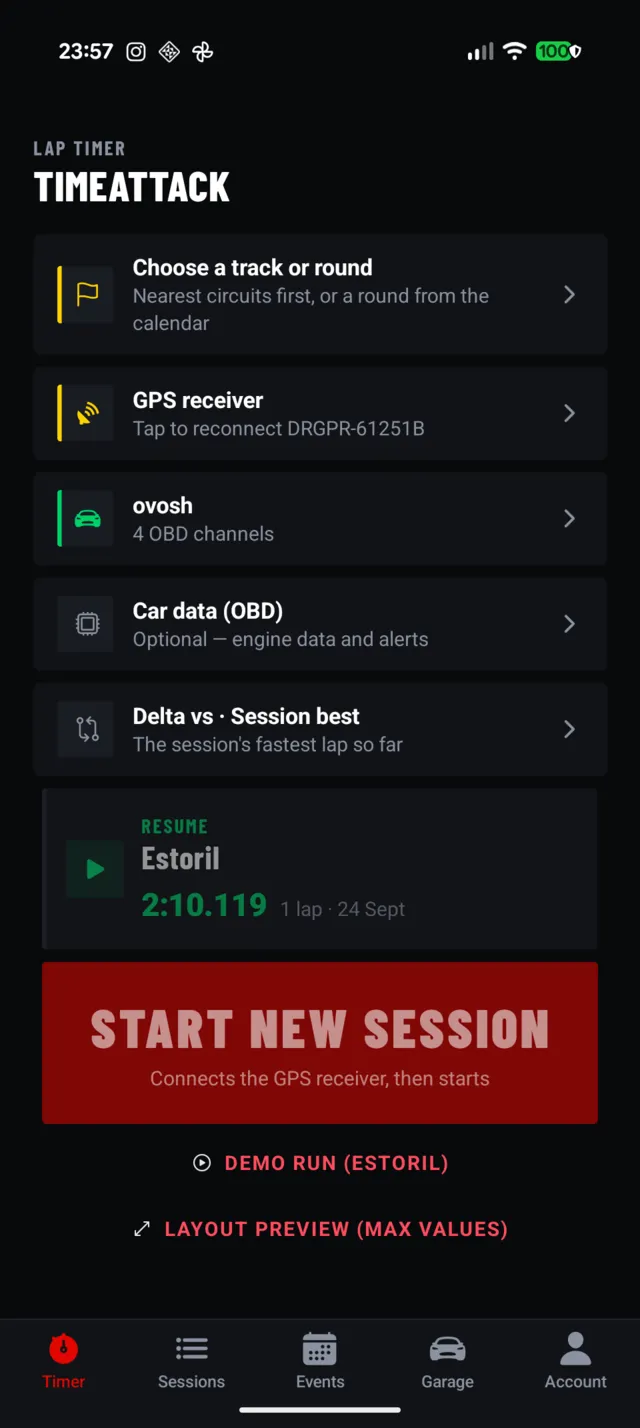
Real screens from the current build. On track you read one big number at a glance; in the paddock every lap opens up.
The car, on your video.
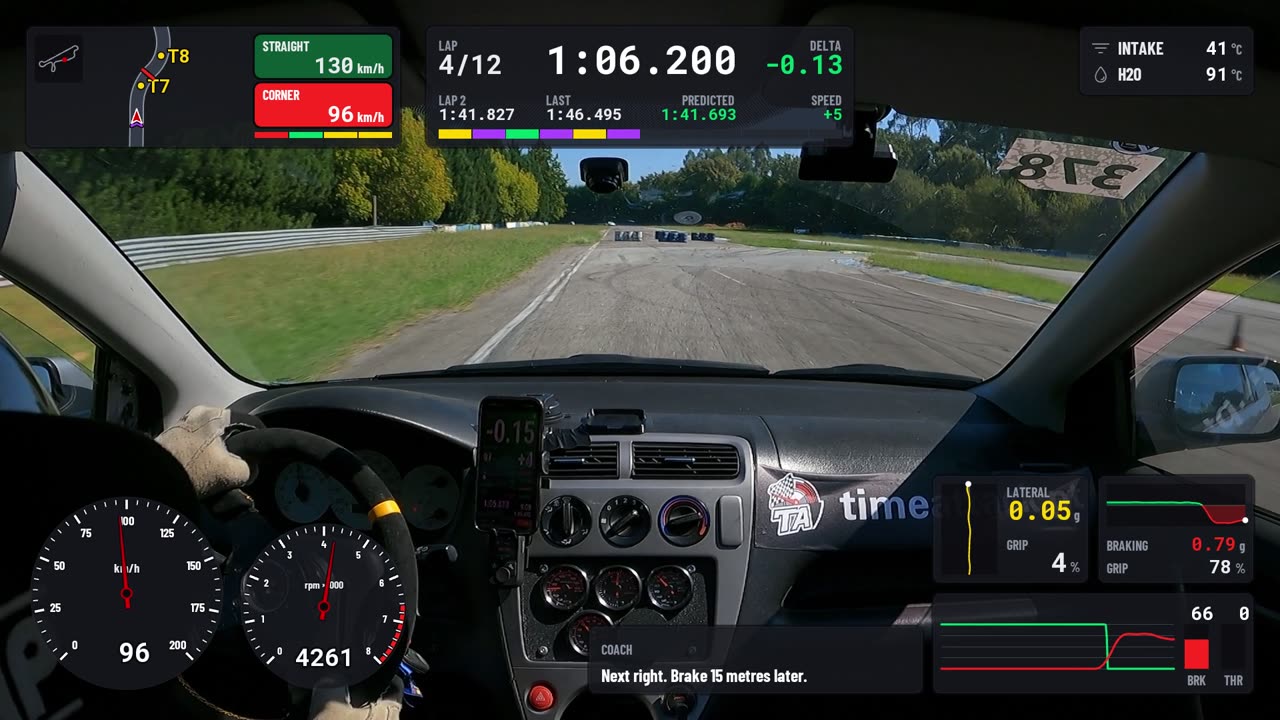
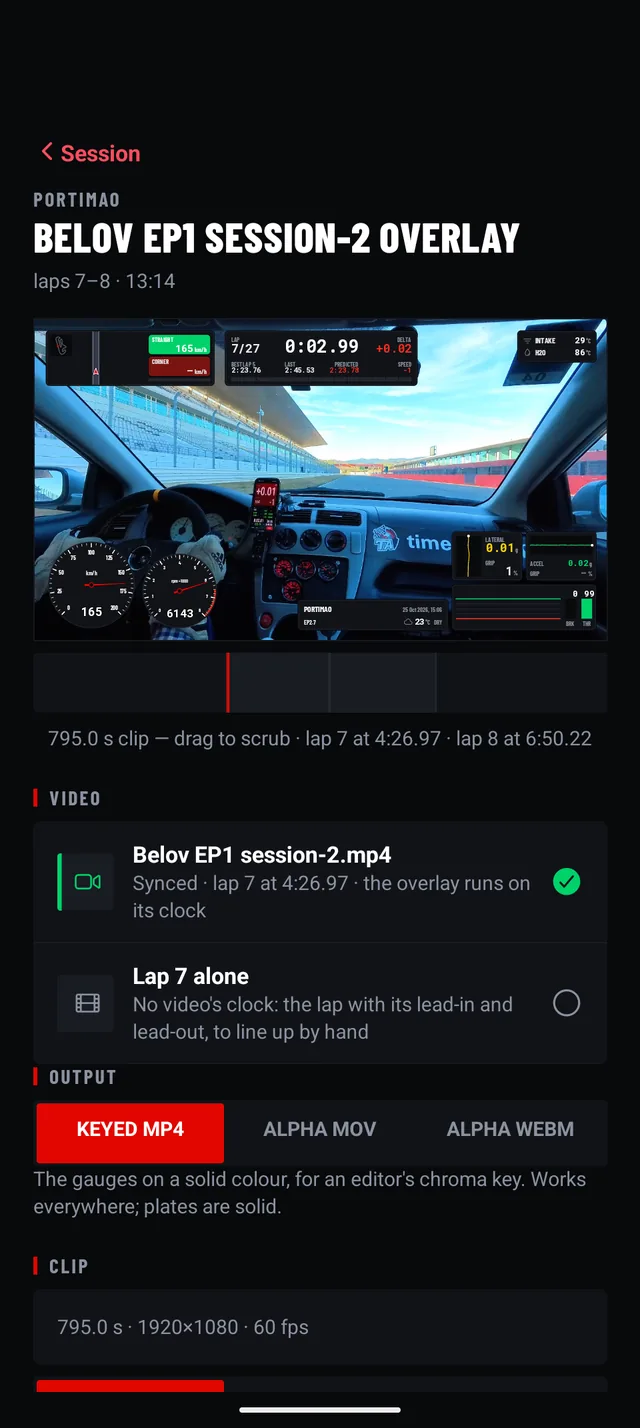
Pair an OBD adapter and the overlay grows an engine: RPM on its own dial, throttle and braking as bars and traces, intake and coolant temperatures in the corner. The coach's words land on the footage too, and so does the verdict.
Your video finds its lap.
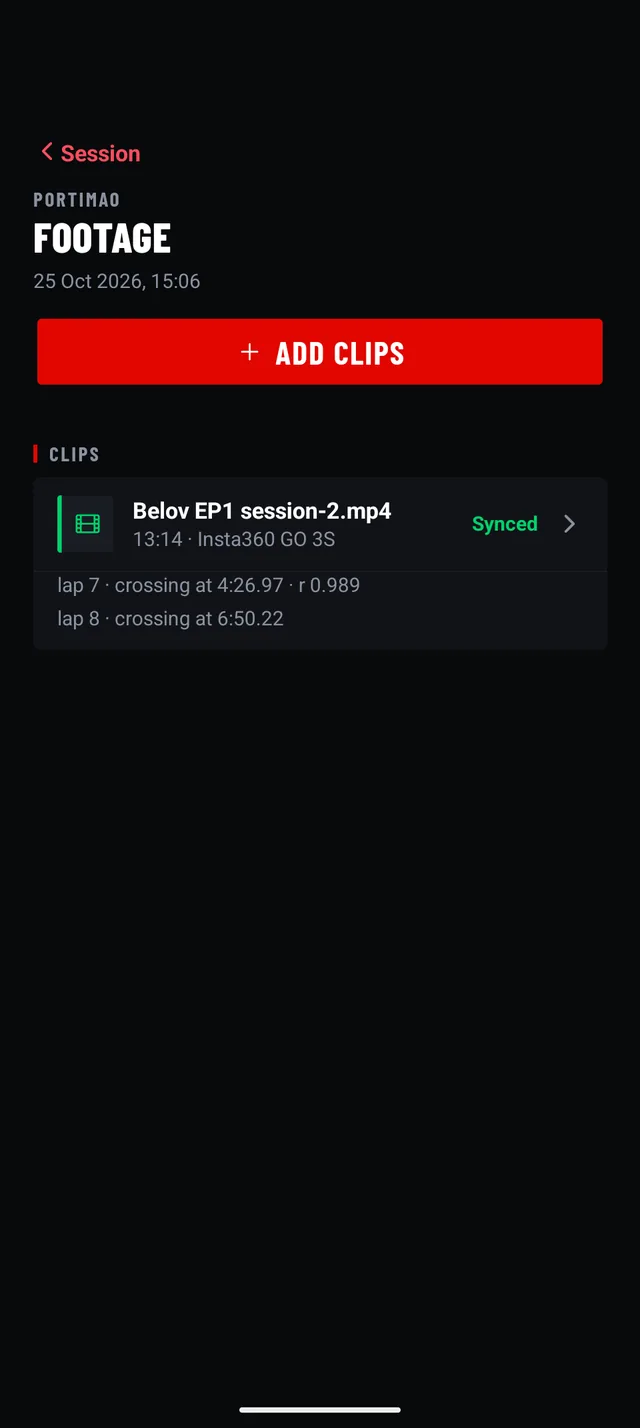
Add the clip from your GoPro or Insta360 and LapTAR finds the laps on it, by matching the camera's own motion with the turns of your laps. Nothing to line up by hand: the overlay comes out on the clip's own clock, so it drops over the footage in your editor and fits from the first frame. Laps on video are marked in the lap list, and their overlay opens on the clip.
Which cameras does it sync?
GoPro, from the motion it records in every clip, and Insta360, from the orientation it writes into the file; the Insta360 reading is tested on the GO 3S. A clip that has been through an editor can lose that data: pick its lap by hand and nudge it into place, and the overlay still runs on the clip's clock.
Where do you rank?
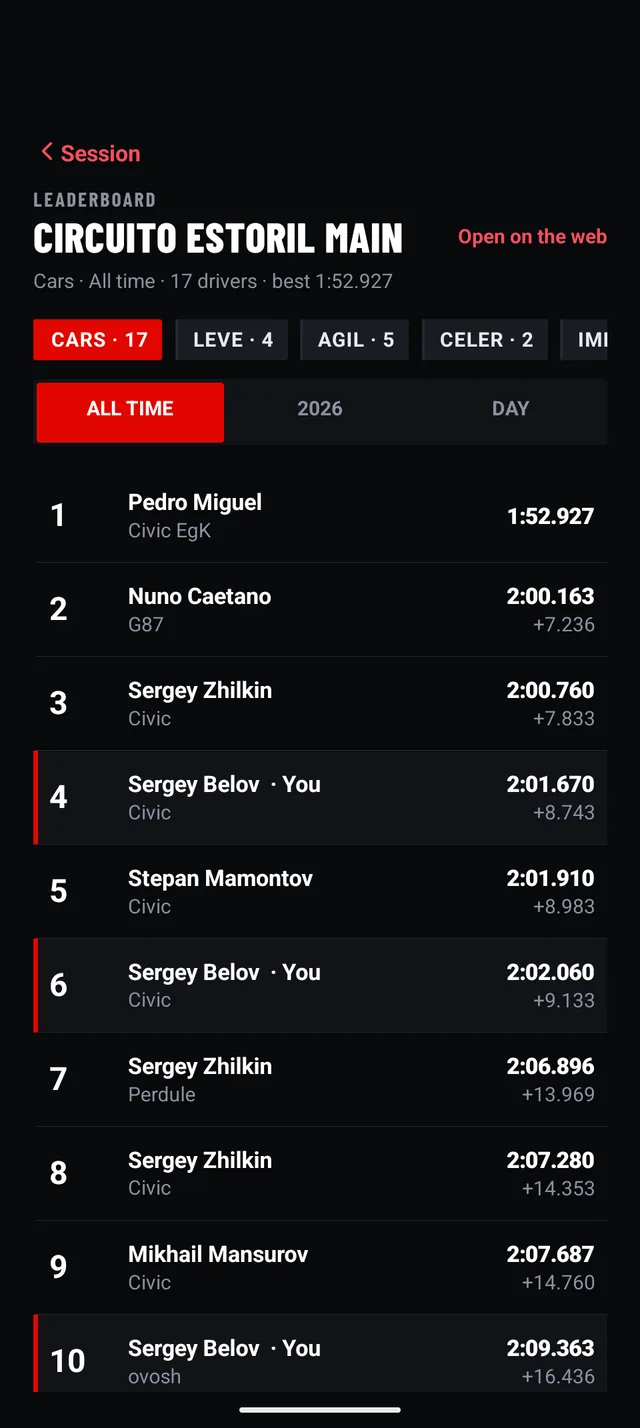
Your laps are private until you choose. Send one as a link and a friend with LapTAR can compare against it, or put it on the track's leaderboard: the server times it again at the painted line, then ranks it among all cars, in its class, or among karts with the same engine. Time Attack's official results are on the same boards.
- Classes estimated from the car's power, weight and tyres.
- Your rank on the session page and on the Timer home.
- That day's drivers: in the analyser, your corners against the laps put on the board that day.
- On the web too: every board opens on timeattack.run.
- Always free: boards, links and karts.
Karts, measured as karts.
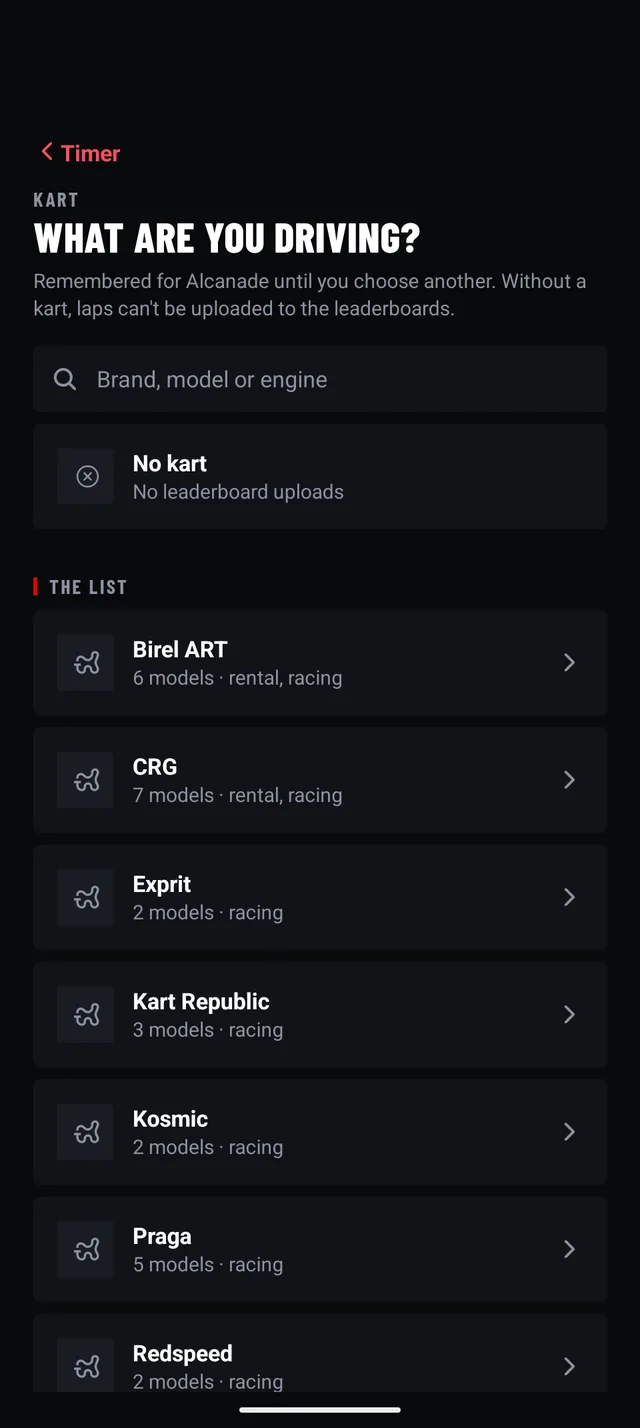
On a kart track the car gives way to the kart: brand, model and engine, rental fleets included. A kart brakes as it turns and runs out of brakes before it runs out of grip, so its corners, braking points and optimal lap are measured the way a kart is driven, and the coach names the braking point first, then the turn-in.
- 116 models from 22 makers, on 29 engines: from rental Honda GX390s and Sodis to Rotax and IAME.
- Each track remembers the last kart you chose there.
- Kart boards, ranked among karts with the same engine.
- Alfano lap files import too.
Everything it does.
A lot happens behind one number. Open anything to see how it works.
On track
Optimal lapSimulated from your car's proven limits, not added-up sectors.
The car's grip, braking and power as measured in the session, driven by a physics model on your best line through each group of corners. It shows the braking points and corner speeds that are within reach, and is rebuilt after every lap.
Live deltaAhead or behind, in one number you can read at speed.
The top of the live screen is the gap to your reference lap, updated as you drive, green when you are ahead and red when behind. Below it, your speed against the reference at the same point, so you see where the gap is being made.
Corner verdictsBrake, trail, turn and exit, graded as you leave each turn.
Each turn is split into four parts. As you leave it, the card shows the time each part cost against your reference and how much of the car you used, with the entry and apex speeds beside them.
Voice coachYour corners called through; the rest coached before and after.
A corner you pick is called like a co-driver would: "Next right. On my call." then brake, turn, power, full throttle on your optimal lap's points, every lap. For the corners that cost the most, the coach says the fix before, for example "Next left. Brake 30 metres later", and better, worse or the same after. It calls the lap at the line, and goes quiet in a corner that goes wrong. How it works.
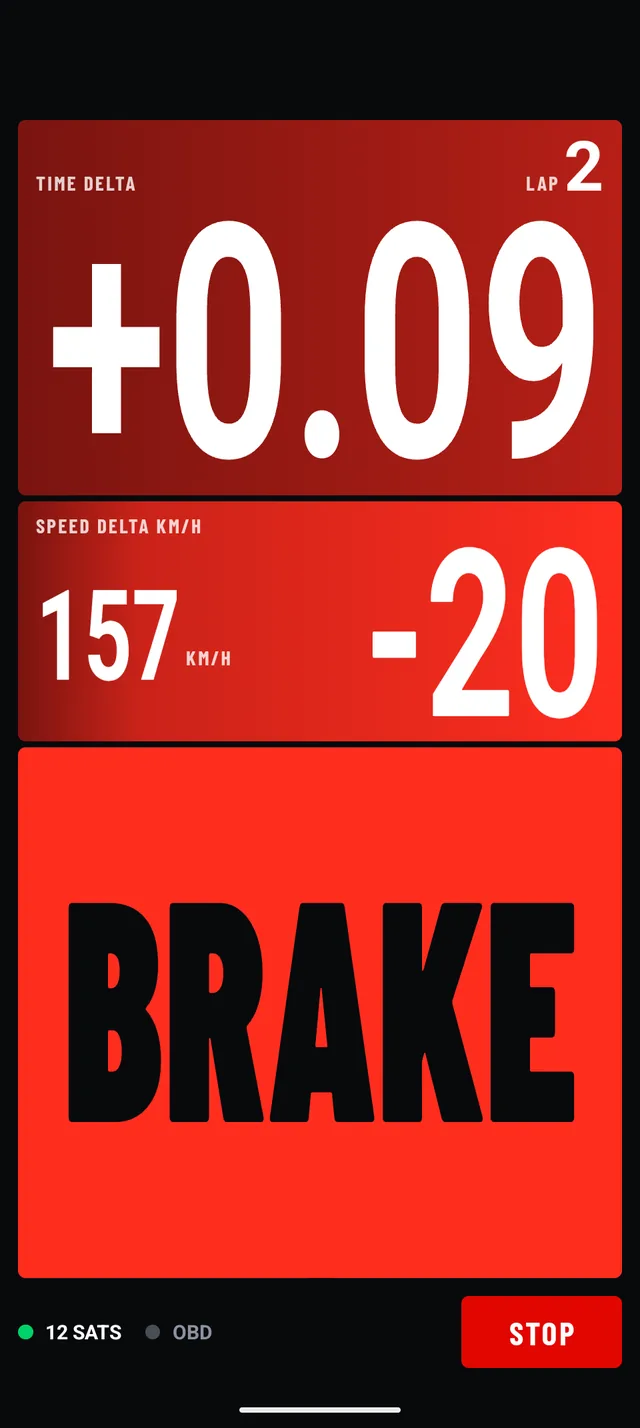
Call panelsBrake, turn, power, as big as the screen.
The corners you chose can be called on the screen as well as in your ear, or instead: full-width BRAKE, TURN and POWER panels you read without looking for them. Part of Pro's coach depth.
Coach onlyCoached, with no times on track.
For days when timing is not allowed. Every lap is recorded and coached, and nothing on the live screen or in the voice is a time: no lap time, no delta. The session page shows every lap afterwards.
GPS receiverA RaceBox or a Dragy, over Bluetooth.
Every lap is timed and every corner judged from the receiver, not from the phone's own location. The satellite count and the receiver's state sit at the bottom of the live screen, and a receiver that drops out is connected again on its own.
Press start and driveNo circuit to pick first.
The recording begins at once, with or without a track, car or kart chosen; the circuit is picked up from where you are as you drive. The surface, the reference and the coach can be changed mid-session from the live screen.
Sessions that resumeStop for the pits, carry on the same session.
Stopping saves the session. Resume it later and the new laps join it, with the lap that spans the break flagged so it never counts as your best.
Either way upUpright or on its side, to suit the mount.
The Timer home, the live screen and the session page work with the phone upright or on its side.
In the paddock
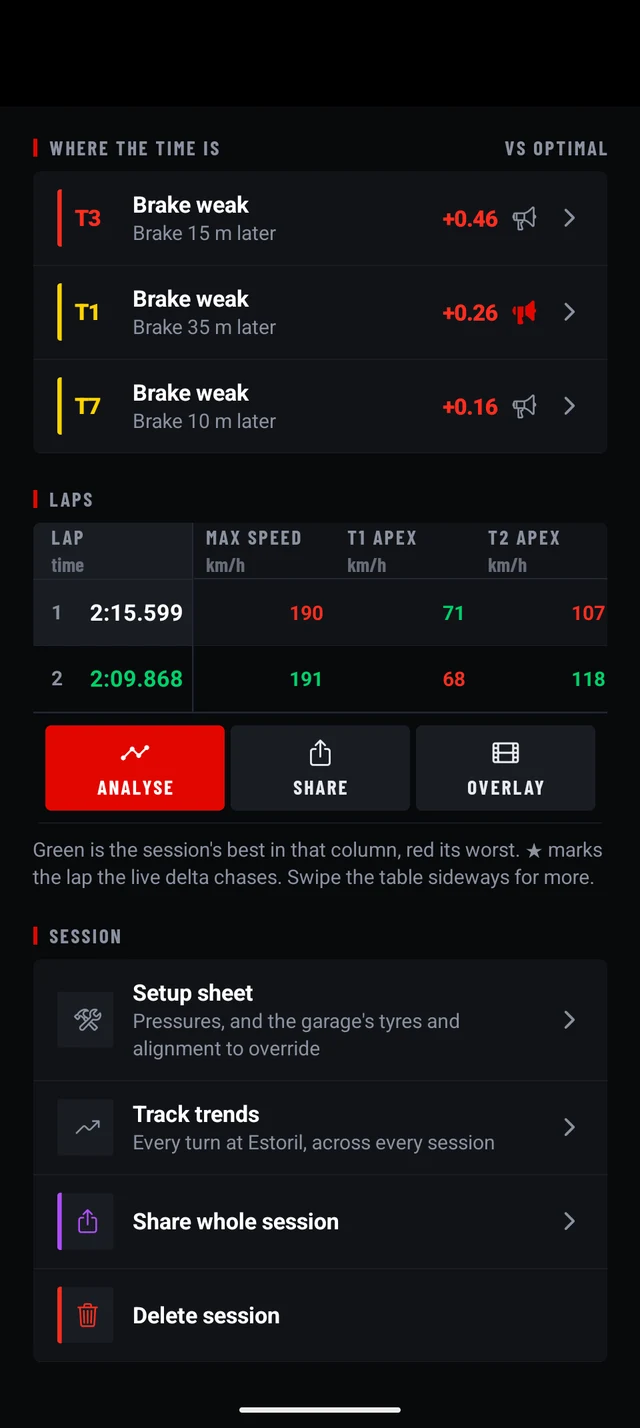
Where the time isThe corners worth the most, each with its fix.
Every session opens on its best and optimal laps, the car's peaks (top speed, lateral and braking g, and engine temperatures and RPM with OBD), how consistent your best laps were, and the corners that cost the most against your optimal, each with the change to make.
AnalyserMap, traces and channels for any lap.
Pick a lap and a corner: a satellite map with your line, traces of acceleration, braking, throttle and RPM, and a list of fixes for that corner with what each one costs.
Lap tableEvery lap and every number side by side.
Lap times, top speeds and apex speeds for every turn, the best and worst in each column marked. Breaks between runs stay visible, laps your video covers carry a camera mark, and from any lap you can analyse, share or export its overlay.
LeaderboardsYour rank at the track, by class or by kart engine.
Put a lap on the track's board and see where it ranks: among all cars, in its class (estimated from the car's power, weight and tyres), or among karts with the same engine. The server times it again at the painted line. Time Attack's event results are on the boards too. Free. More.
Drivers there that dayYour corners against theirs.
In the analyser, compare a lap with the laps other drivers put on the board the same day, or with a lap a friend sent you as a link.
Track trendsEvery turn followed across your sessions.
For each circuit, each turn's best and typical time, apex speed and braking, session after session, so you can see what actually improved. Filter to dry sessions only. The session page says how far you are from your last visit with the same car, what you changed and whether the time came in the corners.
Setup sheetTyres, pressures and geometry with every session.
Note the tyres, cold and hot pressures and geometry for a session, save it as a named setup, and mark the surface dry or wet. From the hot pressures it says which tyre to let down and by how much, and carries that to the next session's cold pressures when you say so. Named setups show up in the trends.
Tyres and alignment, rememberedEvery session keeps what it was driven on.
The tyres on the car and its camber, caster and toe are stamped on each session as they were that day, from the garage. Change them in the garage later and the old sessions keep theirs, so a lap time always sits next to the setup that produced it, and the trends can be sliced by tyre and by setup to show what a change actually did.
Overlay exportYour lap's numbers on your onboard video.
Export any lap as a video overlay to lay over your camera footage in an editor: a keyed MP4 that works everywhere, or a transparent MOV or WebM. 720p, 1080p or 4K, at 30 or 60 fps, with the lead-in and lead-out you choose, or on a synced clip's own clock. With an OBD adapter it also shows RPM, throttle and engine temperatures.
FootageYour clips, matched to your laps.
Add GoPro or Insta360 clips to a session and each is matched to the laps it covers by the camera's own motion. The overlay then renders on the clip's clock, ready to drop over it. How it works.
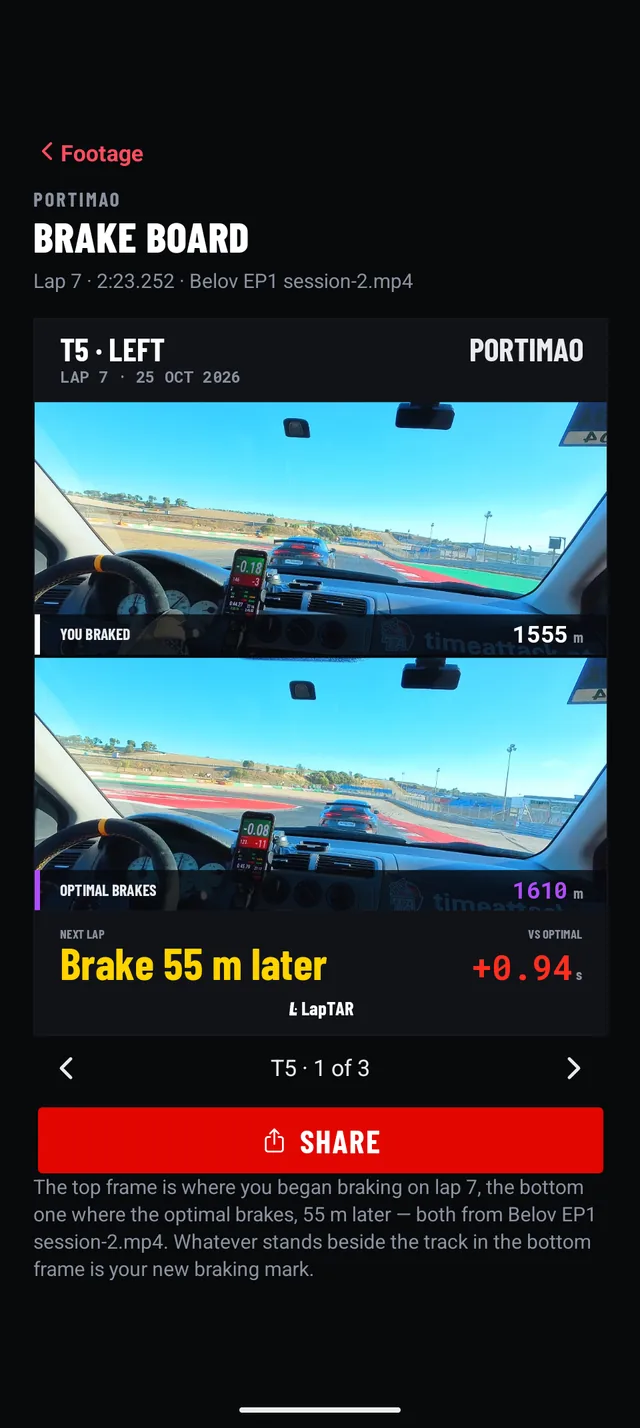
Brake boardYour braking mark, from your own video. Android.
For a corner where the optimal brakes later than you did, two frames from your synced clip: where you began braking, and where the optimal does. Whatever stands beside the track in the lower frame is the mark to brake at. Share it as a picture.
Photo and map cardsA lap, ready to post.
Put a lap's time, car and peaks on your own photo, square, portrait or story, or show the lap on the satellite map full screen, ready for a screenshot.
Your kit
OBDThrottle, brake, RPM and more, per car.
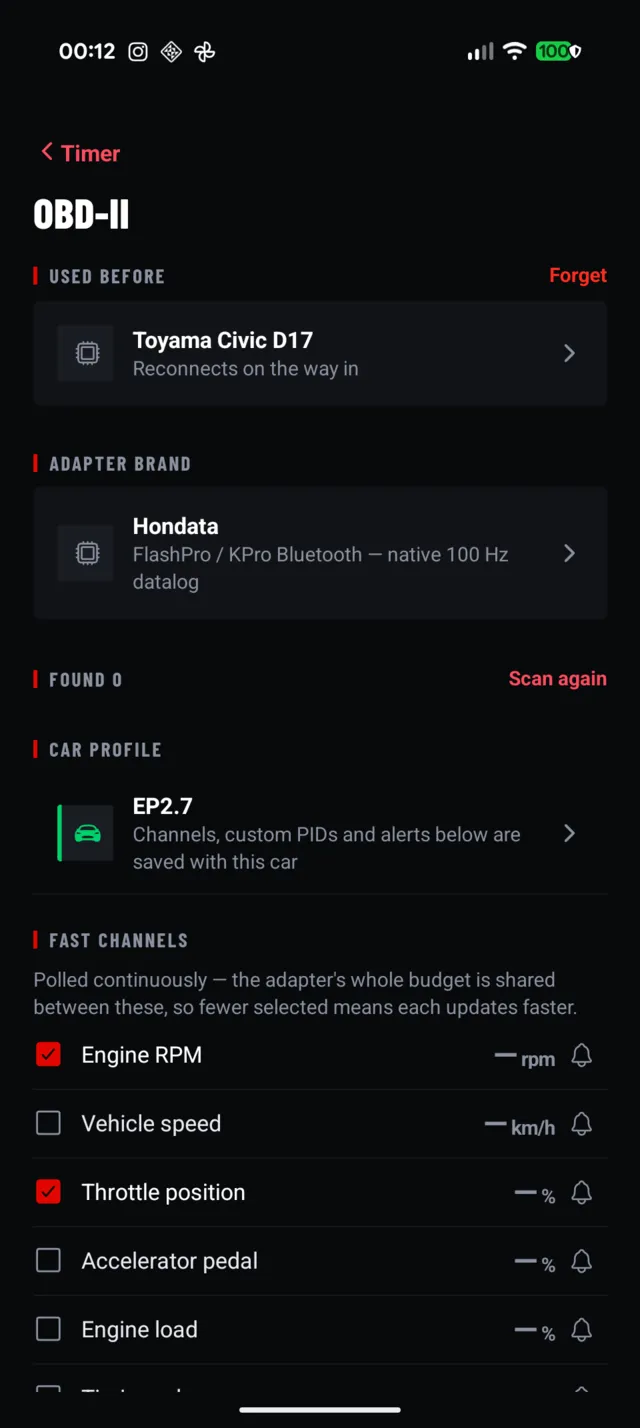
Pair a Bluetooth OBD adapter and choose which channels to poll fast; fewer channels update faster. Each car keeps its own channels, custom PIDs and alerts. Optional: everything else works without it.
Garage and kartsYour cars, and the karts you drive.
Keep every car you drive; the car you pick decides the OBD profile and is noted on each session. On a kart track you pick the kart instead, by brand, model and engine, and the track remembers the last one. Karts.
ImportBring the sessions you already have.
RaceChrono sessions, or a whole RaceChrono backup in about a minute, and DragyLap, Alfano and NMEA files. They get the same analysis as laps recorded in LapTAR: optimal lap, corners, trends. Always free.
CircuitsFound as you drive, the line already drawn.
The library holds thousands of circuits, car and kart, with the start/finish line already drawn, and the app recognises the one you are at, even after you have pressed start. A circuit it does not know, you draw yourself.
Assetto CorsaPractise the real circuit at home, with the same coach.
Point the sim at the phone over Wi-Fi and a lap in Assetto Corsa is timed, judged and coached on the real circuit's map, like a lap on track: delta, corner verdicts, the voice. The app finds the circuit by itself, and sim laps are kept apart from real ones: no car on the sheet, nothing uploaded. A way to learn the braking points before the day.
Free, and Pro.
Until 30 June 2027 every account has Pro, free: the whole day, every feature, nothing to buy. After that your first track day is on Pro, all of it, and then Free is the whole app, the coach included, for the first ten minutes of every session, or the first five timed laps when those take longer: enough to drive a few coached laps everywhere, from a kart track to a long circuit. Pro records the whole day, remembers the track across sessions, coaches as many corners as you ask, and adds the studio end: clean, transparent and 4K overlays, deep OBD and export to other apps. Leaderboards, lap links, karts and importing are always free.
LaunchEvery account on Pro until30 Jun 2027
Free
$0
- Pro for every account until 30 June 2027; after that, your first track day on Pro, until midnight
- Then every feature on this page, the voice coach on one corner a lap
- Ten minutes of recording per session, or five timed laps when those take longer, counted down on the live screen; imported sessions have no limit
- Lap timing with a RaceBox or Dragy receiver; coach only for days without timing
- Live delta, speed delta and corner verdicts against this session
- Optimal lap, where the time is, analyser, lap table
- Leaderboards, lap links, drivers there that day, karts
- Footage synced to your laps, the brake board on Android, photo and map cards
- Setup sheet and the session's tyres and alignment, garage
- Standard OBD-II channels; overlay export as keyed MP4 up to 1080p, with the LapTAR mark
- Import from RaceChrono, DragyLap, Alfano and NMEA
Pro
$5/month · $39.99 once
Free for every account until 30 June 2027. Then in the app on iPhone and Android: monthly, cancel any time in the store, or once for life.
- No recording limit: the whole session, every session
- The track remembered: your best ever lap here as the live reference, trends across every session, earlier setups to load, laps from other days to compare
- Coach depth: up to four corners a lap, and the corners you choose called through, by voice, on screen panels or both
- Clean overlays, transparent (MOV and WebM with alpha) and 4K
- Advanced OBD: custom PIDs, alerts, native high-rate adapters
- Export to RaceChrono, DragyLap and NMEA
How it compares.
The lap timers, devices and overlay tools drivers use most, as their makers list them. Scroll sideways to see them all.
| Feature | LapTARPhone app · by TimeAttack | RaceChronoPhone app · Pro | Harry's LapTimerPhone app · all editions | TrackAddictPhone app · Free / Pro | Garmin Catalyst 2Lap-timer device | AiM Solo 2/ Solo 2 DL · device | RaceBox MiniGPS + app | dragy·LapGPS + app | RaceRender 3Desktop software | Telemetry OverlayDesktop software |
|---|---|---|---|---|---|---|---|---|---|---|
| Price | Free, with Pro for every account until 30 Jun 2027. Then Free: every feature, ten minutes or five laps a session, first track day on Pro; Pro $5/mo or $39.99 once | $19.99 once (iOS); Android $18.99 or in-app | $8.99–$27.99 once, by edition | Free (3 recordings, logo); Pro $8.99 once | $1,199.99 device; cloud plan extra | €430 / €750 DL (excl. tax) | €219–€289 device; app free | $199–$249 device; app free | Free (3 min, logo); $39.95–$59.95 once | $199 once |
| Runs on | iPhone, Android | iPhone, Android | iPhone, Android | iPhone, Android | Own device + app | Own device + PC software | Phone + device | Phone + device | Windows, Mac | Windows, Mac, Linux |
| Extra hardware | GPS receiver: RaceBox or Dragy; OBD optional | Optional | Optional | Optional | Is the device | Is the device | Required | Required | n/a | n/a |
| Voice coaching, live | Yes: the fix before the corner, the verdict after, from the phone | — | — | — | Yes: audible cues on speed, braking and more | — | — | — | n/a | n/a |
| Corners called on their points | Yes: Brake, Turn, Power, each timed to your optimal's own point | — | — | — | — | — | — | — | n/a | n/a |
| Coaching without times | Yes: coach only, for days when timing is not allowed | — | — | — | ? (lap times can be silenced in audio) | — | — | — | n/a | n/a |
| Verdict per part of a corner | Yes: brake, trail, turn and exit, each timed and graded, live and after | — | — (sector times) | — | Yes: by segment, after the session | — | ? | — | — | — (corner-speed gauges) |
| The fix and its cost | Yes: every corner, worst first | — | — | — | Yes: top three opportunities | — | — | — | — | — |
| Optimal lap | Yes, simulated from your car's proven limits on your best lines | Yes: best sectors added up | ? | Yes: best sectors added up | Yes: True Optimal Lap, best segments joined | Yes: best splits added up, in software | — | — | — | — |
| Trends across track days | Pro: every turn followed session after session, by tyres and setup | — | — | — | Annual driving metrics | — | — | — | n/a | n/a |
| Setup sheet per session | Yes: tyres, pressures, alignment, surface | — | Tyres view (Grand Prix) | — | — | — | — | — | n/a | n/a |
| Public leaderboards | Free: each track's board, all cars, by class or karts by engine, timed by the server | — | Online Hall of Fame | — | In the app: by session, day, year, make or model | — | — | Verified laps; event rankings | n/a | n/a |
| Kart mode | Yes: kart by brand, model and engine; braking points, optimal lap and coach measured as a kart's | — | — | — | — | — | — | Karting Mode: kart tracks, 3D kart model | — | — |
| Live delta | Yes | Yes (Pro) | Yes | Yes | Yes | Yes | Yes | Yes | n/a | n/a |
| OBD-II | Yes: standard free, advanced Pro | Yes (Pro) | Yes | Yes | — | DL model only | No (vendor: not yet) | Yes | From log files | From log files |
| External GPS | Yes | Yes | Yes | Yes | — | Built in | Is the GPS | Is the GPS | n/a | n/a |
| Overlay video | Yes: keyed MP4 to 1080p free; 4K Pro | Yes (Pro) | Yes (from Petrolhead) | Yes (logo on free) | Yes (1440p camera) | With SmartyCam (sold separately) | Yes | Yes | Yes, 4K | Yes |
| Coaching on the overlay | Yes: the coach's words and each corner's verdict on the footage | — | — | — | — | — | — | — | — | — |
| Footage synced automatically | Yes: GoPro and Insta360, by the camera's own motion | Pro: GoPro, DJI, Insta360, Garmin, by the clip's GPS | — | — | — (built-in camera) | — (SmartyCam) | Import and sync listed; method not stated | Beta: GoPro, DJI, Insta360, by the clip's motion data | GPS GoPros (HERO5/6), by the clip's GPS | GoPro, Insta360, DJI, by GPS time |
| Transparent overlay | Pro: MOV, WebM with alpha | Mask video (separate MP4) | ? | — | — | ? | — | — | — (chroma key) | Yes (ProRes 4444) |
| Lap image to share | Yes: a lap on your photo, or on the satellite map | — | — | — | — | — | Picture Overlay: session results | Highlight cards | Frame snapshot | Frame screenshot |
| Sim input | Yes: Assetto Corsa, on the real circuit's map | — | — | — | n/a | n/a | — | — | ? | ? |
| Data export | Pro: RaceChrono, DragyLap, NMEA | CSV, VBO, NMEA, GPX, ODS | Several (list ?) | CSV, GPX, KML, VBO | — | CSV, reports | CSV, VBO, GPX (cloud) | VBO | CSV, GPX, KML | Separate product |
| Import | Free: RaceChrono, DragyLap, Alfano, NMEA | VBO, NMEA | VBO, GPX, NMEA | — | n/a | AiM data | — | GoPro, DJI video | Many formats | Many formats |
Checked on 8 October 2026 against each maker's website and app store listings; prices and the rows on coaching, trends, setup and sim input re-checked on 18 October 2026; the rows on coaching without times, leaderboards, karts, footage sync and lap images added, and the coaching rows checked again, on 9 November 2026. Prices are one-off unless stated, in US dollars except AiM and RaceBox, which list euros; they change by region and over time. "—" means the maker does not list the feature, not that it is confirmed absent; "?" means we could not verify it; n/a means it does not apply.
Product names are trademarks of their owners and are used only to identify them; LapTAR is not affiliated with any of them. Spotted something wrong or out of date? Tell us and we will correct it.
Questions.
Do I need any extra hardware?
A Bluetooth GPS receiver, a RaceBox or a Dragy, in the car with the phone. LapTAR times every lap and judges every corner from the receiver, not from the phone's own location. An OBD adapter is optional: it adds RPM, throttle and engine temperatures.
Can I use it on days when timing is not allowed?
Yes: turn on coach only. Every lap is recorded and coached, and nothing on track is shown or said as a time: no lap time, no delta. The times wait for the session page.
Who sees my laps?
Nobody, until you choose. Your laps are private. Send one as a link and whoever has the link can see it; put it on the track's leaderboard and everyone can. A lap on a board can be taken off it again.
I already time laps with another app. Why change?
You need not. Import is free and unlimited for RaceChrono, DragyLap, Alfano and NMEA files, so bring the sessions you have and LapTAR will say where the time went in them: a verdict for every part of every corner, the fix and its cost. The coach, though, only rides along when LapTAR times the lap itself.
Is the coach AI?
No model writes it. Every verdict is measured: the grip your car held, the hardest stop it made and its pull on each straight, on that lap, against the line you drove. The words are a fixed vocabulary, one for each fault, so the same fault always gets the same words and nothing is invented to fill a silence. The optimal lap it coaches against is a physics simulation of those measurements, never a faster driver's ghost.
What does Free record?
Until 30 June 2027, everything: every account has Pro. After that, your first track day, all of it, is on Pro. Then the first ten minutes of each session, or the first five timed laps when those take longer — the same few coached laps at a kart track and at a long circuit — with every feature on and the coach on one corner a lap. The live screen counts it down; when it runs out the recording stops and the session is kept like any other, laps, corners and analysis. Sessions you import have no limit. Pro records the whole day.
What does Pro remember that Free does not?
Anything across sessions. Free analyses each session on its own: its laps, its optimal, its corners, its setup sheet. Pro keeps the track: your best ever lap here as the live reference, every turn's trend session after session, earlier setups to load, and laps from other days to compare in the analyser.
Who makes it?
The people behind TimeAttack, the Portuguese time attack championship, who wanted a timer that says what to change rather than only how much it cost.
Can I try it before a track day?
In Assetto Corsa, yes: point the game at the phone over Wi-Fi and a lap of the real circuit at home is timed, judged and coached as it would be on track. And the sessions you already have, from RaceChrono, DragyLap, Alfano or an NMEA file, import with the same analysis.
Next session, coached.
Free on iPhone and Android, with Pro for every account until 30 June 2027.